Permissions Overview
Permissions can be managed at different levels:
- Organization level: Owner and Administrator are global roles. An Owner has full rights, including creating apps, managing subscriptions, and managing permissions.
- App level: App Manager rights are scoped to one specific app.
- Module level: some modules have their own roles, like Verifier, Editor, Referee, or Moderator, for specific actions within that module. Any user can be granted a module's role.
Only Organization Administrators can be assigned as App Managers (Organization Owners have permanent management rights on all apps).
- Step 1: Go to Permissions in the left-hand menu.
- Step 2: Review the list of Organization Administrators.
- Step 3: Toggle App Manager rights per person.
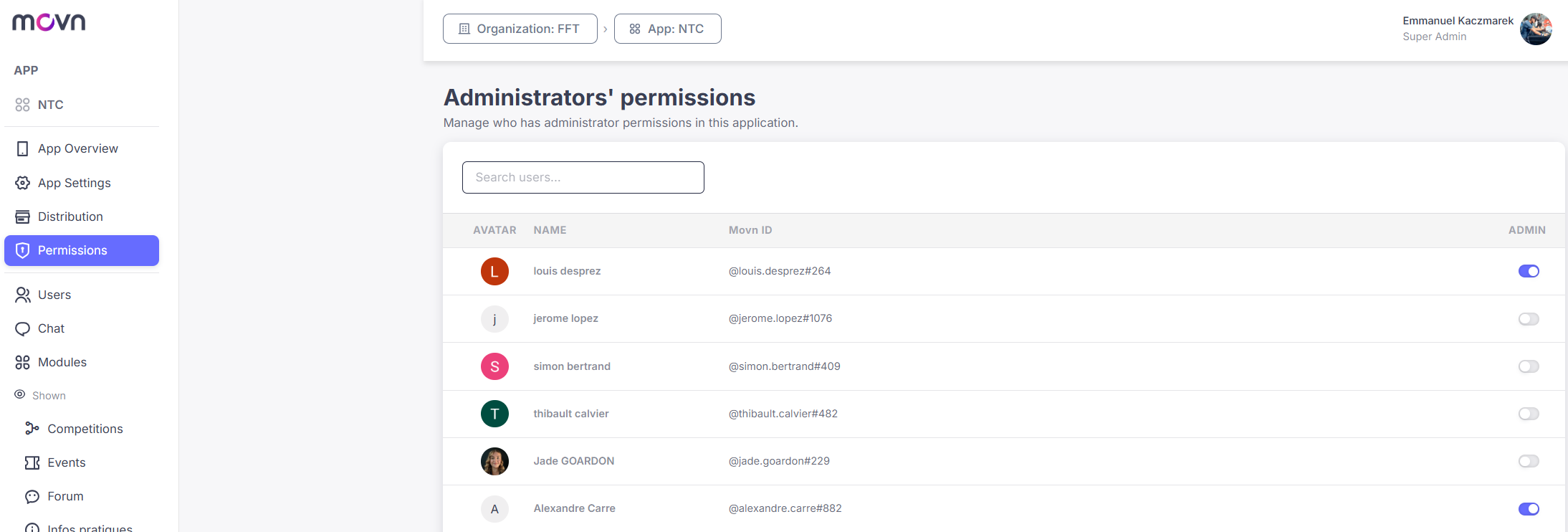
Use App Manager rights when someone needs to configure modules, manage content, or operate a specific app end to end. Don't use it for narrower, one-off tasks, event check-in, for example, is better handled with a Verifier role instead.
A common mistake is trying to assign App Manager rights to someone who isn't already an Organization Administrator, that isn't possible, they need Administrator access first.
Pro Tip: Admin means access to the system, App Manager means the ability to manage a specific app, and Module roles mean the ability to perform specific actions within a module.